
Key Takeaways
- The Core Dilemma: Most online croppers flatten pages into lossy 72–150 DPI JPEG bitmaps, permanently blurring text and destroying Ctrl+F searchability.
- True Lossless Cropping: Authentic PDF cropping modifies the native
/CropBoxdictionary coordinates in ISO 32000 structures, keeping 100% of vector typography and CAD paths untouched. - The PDF Box Hierarchy: The
MediaBoxdefines the physical sheet, while theCropBoxcontrols the viewer display window. Non-destructive cropping updates only the display window. - Client-Side Privacy: Trimming sensitive architectural blueprints, legal discovery binders, or tax records in local browser memory guarantees zero cloud exposure.
When legal teams, engineers, or academic researchers attempt to crop oversized margins or eliminate header clutter from a PDF, they frequently discover an unpleasant surprise: the cropped document looks blurry, fonts have degraded into fuzzy pixels, and text can no longer be highlighted, copied, or searched.
This degradation happens because traditional cloud resizers and desktop print spoolers often treat PDF cropping as a rasterization process. They convert rich vector drawing commands and embedded TrueType or OpenType fonts into flattened JPEG bitmaps before slicing the edges.
True, professional PDF cropping is fundamentally different. Under the international ISO 32000 standard, authentic PDF cropping never rasterizes or downsamples page contents. Instead, it modifies internal coordinate matrices inside the document dictionary without altering a single vector byte.
In this comprehensive technical guide, you will learn the exact mechanics of lossless vector cropping, how the PDF box model works under the hood, and how to trim page margins with millimeter precision directly inside your web browser sandbox with zero cloud exposure.
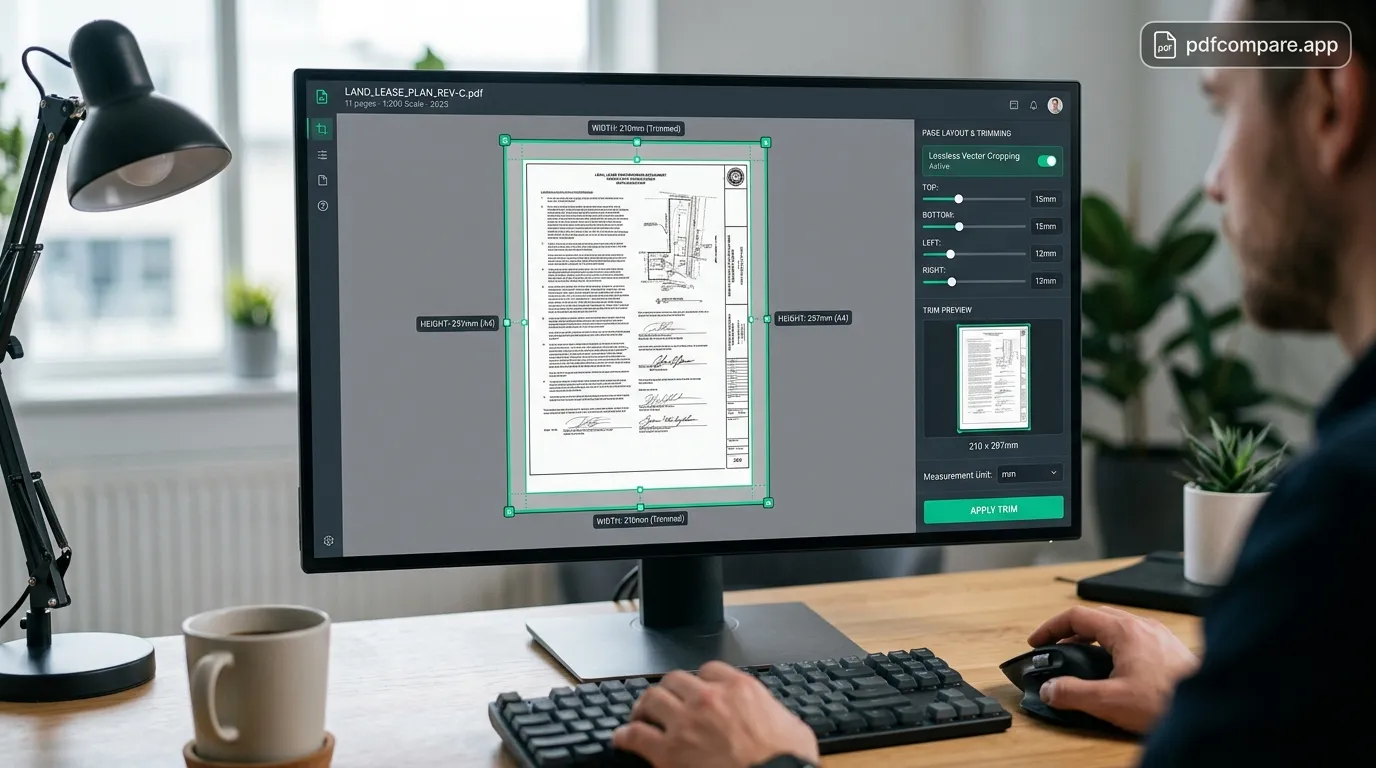
To crop a PDF without losing quality, you must modify the document native /CropBox dictionary coordinates rather than flattening the page into an image. By using a WebAssembly-powered browser engine like PdfCompare Crop Studio, margin boundaries are adjusted losslessly in local RAM. Embedded typography, searchable text streams, and CAD vector paths remain 100% razor-sharp, with zero server uploads.
Why Common PDF Cropping Methods Destroy Image and Font Clarity
To understand why conventional tools ruin document quality, it helps to examine the fundamental difference between a raster image file and an authentic vector PDF container.
The Raster Flattening Trap
Most free web converters and generic screenshot utilities operate on a lossy three-step workflow:
- Rasterization: The PDF renderer renders vector bezier curves and font glyphs into a 72 DPI or 150 DPI canvas image.
- Pixel Slicing: The server deletes edge pixels corresponding to your margin crop selection.
- Lossy Compression: The sliced canvas is re-encoded as a JPEG image and wrapped inside a new blank PDF shell.
Raster Flattening vs Lossless Vector Cropping
Why budget converters destroy text readability and how vector coordinate transformation preserves full clarity.
- Text turns into non-selectable, non-searchable image pixels
- Fuzzy font haloing when zoomed on Retina/4K screens
- File size frequently expands by 300% to 800%
- Text remains 100% searchable (Ctrl+F) and copyable
- Infinite vector zoom sharpness at any scale
- Fully reversible non-destructive document geometry
This rasterization pipeline introduces three permanent points of failure:
- Irreversible Typography Degradation: Characters lose mathematical curve definitions. At high zoom levels (200% to 500%), letters develop jagged compression artifacts and blurriness.
- Complete Loss of Text Layer: Because glyphs are converted to pixels, OCR or clipboard copying becomes impossible unless an error-prone second pass is attempted.
- File Bloat: Counterintuitively, converting concise vector drawing instructions into high-resolution pixel matrices often causes file size to expand by 300% to 800%.
The Vector Coordinate Transformation Solution
Authentic PDF cropping never modifies the underlying stream objects (the actual letters, paths, and photographs stored on the page). Instead, it updates a four-element array within the page object dictionary known as the CropBox:
/Type /Page
/Parent 3 0 R
/MediaBox [ 0 0 612 792 ]
/CropBox [ 36 54 576 738 ]
/Contents 4 0 R
In the example above, the physical medium (MediaBox) remains standard US Letter (612 × 792 PostScript points), but the viewer is instructed to render only the rectangular window starting at coordinate [36, 54] and ending at [576, 738]. Every vector line, embedded barcode, and paragraph text stream inside that window retains 100% of its native mathematical precision.
Understanding the ISO 32000 PDF Box Model
The Portable Document Format defines up to five concentric bounding boxes for every single page in a document. Mastering the relationship between these boxes is essential for professional document preparation, prepress printing, and digital archiving.
ISO 32000 PDF Page Box Model Architecture
Understanding how MediaBox, CropBox, and TrimBox interact during non-destructive page boundary adjustments.
CropBox (Active Viewer Display Window)
Primary Target for CroppingThe visible region displayed by screen viewers (Chrome, Safari, Adobe Reader, Kindle). Updating CropBox coordinates trims away margins losslessly without re-encoding vector artwork.
/CropBox array in the PDF dictionary, it updates only four floating-point coordinates. It never decodes or re-compresses embedded fonts, Bézier curves, or photographic rasters.1. MediaBox (The Physical Medium)
The MediaBox defines the physical boundaries of the medium upon which the page is intended to be displayed or printed. For example, standard A4 paper is defined as [0 0 595.28 841.89]. The MediaBox is the largest box on the page; all other page boxes are mathematically constrained to sit within its coordinates.
2. CropBox (The Display Window)
The CropBox defines the region to which the contents of the page are clipped when displayed or printed by standard PDF viewers. When you open a cropped document in Adobe Acrobat, Apple Preview, Google Chrome, or an e-reader, the application scales and renders only the area enclosed by the CropBox.
If a page object dictionary does not explicitly define a CropBox, standard viewers automatically default to the dimensions of the MediaBox.
3. BleedBox (Prepress Production)
In commercial printing workflows, artwork often extends past the final trimmed edge to ensure that cutting tolerances do not leave unprinted white slivers. The BleedBox specifies the clipping boundary for production environments, typically extending 3mm to 5mm beyond the TrimBox.
4. TrimBox (The Finished Cut Boundary)
The TrimBox indicates the intended final dimensions of the printed page after commercial guillotine cutting (for instance, a finished bound book page or brochure format).
Developer Insight: Because lossless cropping only updates the /CropBox array, the operation is completely reversible. If you ever need to restore cropped margins, you can simply reset the /CropBox values back to equal the /MediaBox coordinates.
Comparative Analysis of PDF Cropping Tools
Different tools approach page boundary adjustments through vastly different architectural models. Before choosing an approach for confidential contracts or technical schematics, consider the trade-offs across vector fidelity, privacy, and licensing cost.
PDF Cropping Methods Comparison Matrix
Evaluating vector sharpness, text stream preservation, privacy boundaries, and cost overhead.
| Method & Tool | Vector Fidelity | Text Selectability | Underlying Engine | Server Leak Risk | Pricing / Cost |
|---|---|---|---|---|---|
PdfCompare Crop StudioRecommended Contracts, blueprints, kindle reading, margin trimmingLaunch Crop Studio | 100% Lossless Vector (Preserves fonts & text streams) | 100% Selectable | Direct PDF CropBox / MediaBox dictionary rewrite | 0% (Client Browser WebAssembly RAM) | 100% Free Forever |
Adobe Acrobat ProPaid Suite Prepress publishing & enterprise document preparation | Lossless Vector | 100% Selectable | Acrobat Native Page Geometry Engine | Low (Local Desktop, Cloud sync opt-in) | $239.88 / user / year |
Generic Cloud PDF ResizersOnline Tools Non-sensitive personal flyers or one-off sheets | Lossy (Often flattens pages into JPEG rasters) | Lost / Flattened | Server-side Canvas / Image re-compression | High (Document uploaded to 3rd-party servers) | Freemium (File size caps & subscription upsells) |
Virtual Print to PDF (Scale)OS Print Tool Quick shrink-to-fit printing on physical printers | Unpredictable (Margin clipping & font reflow bugs) | Lost / Flattened | Print Spooler PostScript rasterization | 0% (Local OS Spooler) | Included in OS |
Key Evaluation Criteria
- Vector Fidelity: Does the engine maintain font glyph outlines and CAD drawing precision, or does it downsample content to bitmap images?
- Text Searchability: Can end-users still press
Ctrl+F/Cmd+Fto search through clauses and numbers after the crop is applied? - Data Privacy: Are confidential architectural blueprints, tax records, or legal agreements uploaded to unknown remote servers, or does the file remain entirely inside your local device RAM?
- Subscription Overhead: Is the utility available on demand without recurring subscription fees or mandatory account registrations?
Step-by-Step Guide: How to Crop PDF Pages Losslessly in Browser Memory
Using our dedicated client-side utility, you can trim white borders, eliminate unwanted headers, and optimize documents for mobile reading in seconds without installing desktop software.
Step 1: Open Crop Studio and Load Document
Navigate to the free PdfCompare Crop PDF Studio in any modern web browser. Drag and drop your target PDF into the studio dropzone, or click Choose PDF File to select it from your device.
Step 2: Set Crop Boundaries Visually or via Presets
Use the interactive on-canvas crop box handles to drag the top, bottom, left, and right margins to your exact desired framing. Alternatively, use the Quick Smart Presets:
- Auto-Trim Margins: Scans the luminance of the page canvas to automatically detect where text begins and snaps the crop box right to the content boundary.
- Cut Header & Footer: Automatically strips a uniform 10% band from the top and bottom to eliminate running headers, page numbers, and Bates stamps.
- Percentage Sliders: Fine-tune individual edge margins with single-percent precision.
Step 3: Select Scope and Export Clean Vector PDF
Choose whether to apply your crop configuration to All Pages (ideal for uniform books and reports) or the Current Page (ideal for standalone blueprint cover sheets). Click Download Cropped PDF. The updated document dictionary is assembled directly inside your browser memory and downloaded instantly.
Caution Regarding Scanned Documents: If your original PDF consists purely of flat scanned photographs (such as phone camera snapshots or legacy paper scans without an OCR text layer), cropping will adjust the frame boundaries losslessly, but it cannot retroactively convert existing bitmap pixels into scalable vector fonts.
Real-World Use Cases for Precision Margin Cropping
1. Architectural and Engineering Blueprint Framing
Architectural blueprints often include extensive title blocks, revision histories, and disclaimer margins around the perimeter of technical floor plans. When sharing focused schematics with subcontractors or inserting details into client presentations, engineers use vector cropping to isolate specific structural details without losing microscopic CAD linework precision.
2. Legal Contract Header and Bates Stamp Clean-Up
During legal discovery and contract negotiation iterations, documents frequently accumulate conflicting header annotations, obsolete draft stamps, and conflicting pagination bars. Trimming the top and bottom margins allows legal counsel to standardize page geometries before running automated differential analysis with a dedicated Contract Comparison Tool.
3. Academic Paper Optimization for E-Readers (Kindle & iPad)
Dual-column research papers published by IEEE or arXiv feature expansive margins designed for traditional physical printing. Reading these documents on a 6-inch or 10-inch e-ink reader forces constant pinching and panning. By eliminating excessive whitespace via an automatic margin trim, the effective font size on mobile screens increases by up to 35%, dramatically reducing eye strain.
4. Financial Statement Table Formatting
Quarterly earnings reports and balance sheet appendices often feature wide asymmetrical margins that truncate or wrap when imported into executive summary decks. Trimming page edges ensures that dense financial data tables align seamlessly with presentation slide dimensions.
Technical Edge Cases and Pitfalls to Avoid
Pitfall 1: Assuming Crop Reduces File Size
A common misconception among document administrators is expecting that cropping 50% of a page's visual area will reduce its byte size by 50%.
In standard vector cropping, this does not happen. Because the operation is non-destructive, the underlying font libraries and vector drawing commands remain embedded inside the PDF file structure. If your ultimate goal is minimizing transfer bytes for email attachments, you should combine vector cropping with our client-side Compress PDF Tool to optimize embedded streams.
Pitfall 2: Asymmetric Margins in Two-Sided Book Printing
When cropping books or formal reports designed for duplex (two-sided) printing, odd and even pages typically feature mirrored margins (wider inner margins for binding gutters, narrower outer margins). Applying a uniform crop box across all pages can accidentally clip text on alternating even-numbered pages. Always preview both odd and even pages in the navigator before applying a global crop scope.
Pitfall 3: Hidden Sensitive Data Liabilities
Because standard PDF cropping merely hides content outside the CropBox window rather than permanently purging the underlying stream objects, sensitive text (such as social security numbers, confidential trade figures, or private names) located in the cropped margin remains recoverable by specialized forensic software.
Security Note: If you are cropping a document to redact legally protected trade secrets or personal identification numbers (PII), cropping alone is not a substitute for true irreversible redaction. If the underlying data must be destroyed permanently, the text objects themselves must be removed from the content stream.
Frequently Asked Questions
Frequently Asked Questions
No. Vector cropping adjusts the visual viewing window (the CropBox dictionary) without altering the underlying content streams. Because the original vector paths, images, and embedded fonts are preserved to allow non-destructive undoing, file size remains virtually identical. To reduce file size, use our Compress PDF tool after cropping.
Complete Your Document Workflow
Cropping page margins is frequently one step in a broader document preparation workflow. Whether you need to extract isolated pages, audit modifications between revisions, or stamp confidential watermarks, our browser-native utility suite guarantees total data privacy:
- Trim Margins Instantly: Open our free Crop PDF Studio to adjust page boundaries losslessly with millimeter precision.
- Extract Individual Pages: Use the Split PDF Tool to separate multi-page documents into distinct chapters or standalone sheets.
- Verify Redline Revisions: Compare two PDF contracts side-by-side with semantic text highlighting on our flagship Contract Comparison Studio.